
SMS Message Default Templates
The following list of SMS text message templates is used in the EnRoute system. This allows you to easily copy and paste and adjust the default text, as well as see what variable names are available in each message.
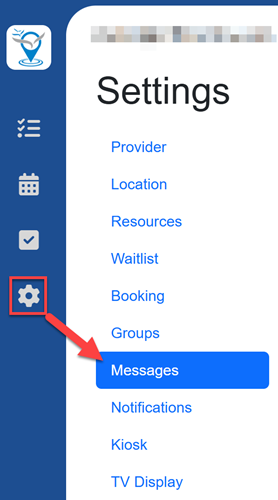
You can customize your messages by going to Settings / Messages.
Variables
In addition to the variables listed in the Message Default columns below, you can also use these variables:
- [LocationName] adds your location to the message
- [ReturnTime] adds a date and time to the message
- [Link] adds link for customer to see their place in line
- [PlaceInLine] adds customer's position to the message
Waitlist Messages
| Name | Description | Message Default |
|---|---|---|
| Welcome Message | When a customer joins online, send this Welcome text message | |
| First Check-in Warning | When you notify a customer who is not checked in and was not already given a Return Time | |
| Final Check-in Warning | When you notify a customer who is not checked in and is passed their Return Time | |
| Ready Message | Sent to notify a checked-in customer that they are ready for service. For more flexibility, follow "Next in Line" approach to the messaging. | |
| Ready Push Notification | Sent to the EnRoute Mobile app to notify a checked-in customer that you are ready for service |
Booking Messages
Booking messages can be configured as Call Ahead Seating or Reservation, which changes the set of messages sent to the customer.
Turning off Auto Approve Bookings also hides some of the messages in the settings screen.
Call Ahead Seating:
| Name | Description | Message Default |
|---|---|---|
| Call Ahead Welcome Message | When joining online, send call ahead welcome message | |
| Booking Approval Needed Message | When joining online and approval needed | |
| Booking Approved Message | When a booking is approved | |
| Booking Declined Message | When a booking is declined | |
| Call Ahead Reminder Message | Send prior to call ahead seating time | |
| Booking Cancelled Message | Send when a booking is cancelled |
Reservation:
| Name | Description | Message Default |
|---|---|---|
| Reservation Welcome Message | When joining online, send reservation welcome message | |
| Booking Approval Needed Message | When joining online and approval needed | |
| Booking Approved Message | When a booking is approved | |
| Booking Declined Message | When a booking is declined | |
| Reservation Reminder Message | Send prior to reservation time | |
| Booking Cancelled Message | Send when a booking is cancelled |
Group Booking Messages
| Name | Description | Message Default |
|---|---|---|
| Group Booking Approved Message | When a group booking is approved | |
| Booking Approval Needed Message | When joining online and approval is needed | |
| Group Booking Declined Message | When a group booking is declined |